



WooCommerce makes it pretty simple to create a storefront. But bringing sales? That solely relies on the store owner, and how solid the marketing and sales strategies are.
Having worked with thousands of store owners, we’ve seen a common pattern – most store owners struggle with sales and conversions.
They bring in traffic, upload products, run campaigns, and even pay for ads… but conversions just don’t match the effort.
There are no shortcuts to WooCommerce sales, but there are some tricks that help grow stores. In this blog, we’re going to go through 20 proven ways to increase WooCommerce sales that you can implement right away.
Let’s get started!
20 Proven Hacks to Increase Your Online Sales – Tips from Experts
Before diving deep into the specifics, let’s have a look into the proven hacks that you can follow from day one to increase your WooCommerce sales!
- Hack #1: Optimize & Speed Up Your Store
- Hack #2: Establishing Trust In Your Store
- Hack #3: One-Page Checkout
- Hack #4: Express Payments & Buy Now, Pay Later
- Hack #5: Eliminate Surprise Costs
- Hack #6: Optimize Mobile Checkout
- Hack #7: Cart Recovery Emails
- Hack #8: SMS
- Hack #9: Exit-Intent Popups
- Hack #10: Context-Aware Charm Pricing
- Hack #11: Decoy Effect in Bundles & Plans
- Hack #12: Price Anchoring
- Hack #13: Introduce Scarcity
- Hack #14: Show The Savings
- Hack #15: Frequently Bought Together
- Hack #16: Post-Purchase Upsells
- Hack #17: Upsells Across the Funnel
- Hack #18: Building a Review Engine
- Hack #19: Social Proofs
- Hack #20: Real-Time Activity Notifications
Excited yet? Let’s get started into discussing all the hacks that you can implement right away!
Hack #1: Optimize & Speed Up Your Store
Let’s be real – WooCommerce is pretty bloated. An average WooCommerce site takes about 13.25 seconds to load on mobile.
This would’ve been great for 2000s standards, but in 2026?
A site that takes 5 seconds to load loses approximately 21% of potential conversions compared to a 2-second site.
In pure revenue terms, if you’re doing $100,000/month, a slow site might be costing you $21,000/month in lost conversions.
You can speed up your checkout process by implementing a small, but highly effective tweak – enabling HPOS in your store.
WooCommerce’s legacy database structure stores order data alongside regular post data. It works, but it’s like storing your luxury watches in the same drawer as socks.
What is HPOS? High-Performance Order Storage separates order data into dedicated, commerce-first database tables. The result: 5x faster order creation and 1.5x faster checkout completion.
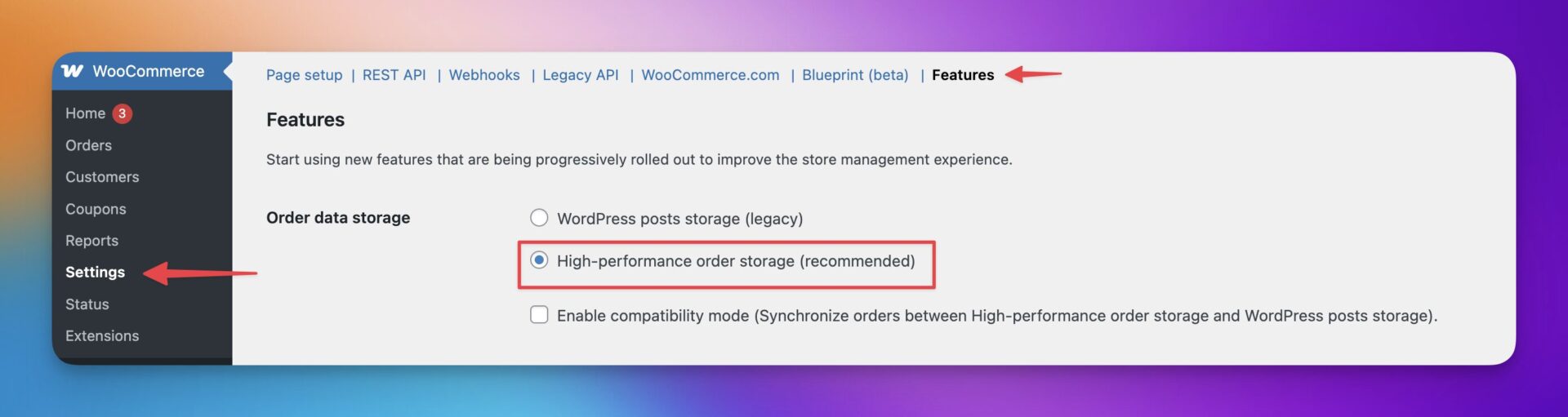
WooCommerce enables HPOS by default. However, if you want to check if it is enabled, feel free to visit the HPOS documentation by WooCommerce to locate the settings in your store.
Not only that, you can implement strategic caching of your pages to load only the ones that are requested by the user.
Strategic caching reduces the load on your server by storing ready to deliver versions of your most important pages so customers never wait for your site to rebuild them from scratch.
Disabling unnecessary plugins in your store also reduces script load, database calls, and background processes that quietly drain the speed of your store.
You can choose to use a script if the plugin solves a small yet niche problem, or find all-in-one plugins that add the same features without installing multiple ones.
Hack #2: Establishing Trust In Your Store
Shoppers buy from stores they trust, and trust is built long before they reach the checkout.
Establishing credibility throughout your WooCommerce experience reduces hesitation, increases confidence, and makes every call to action more persuasive.
Clear policies, visible activity, authentic reviews, and transparency around shipping and products all work together to create a store that feels reliable and familiar.
When customers believe your store is safe and legitimate, conversions rise naturally without aggressive tactics.
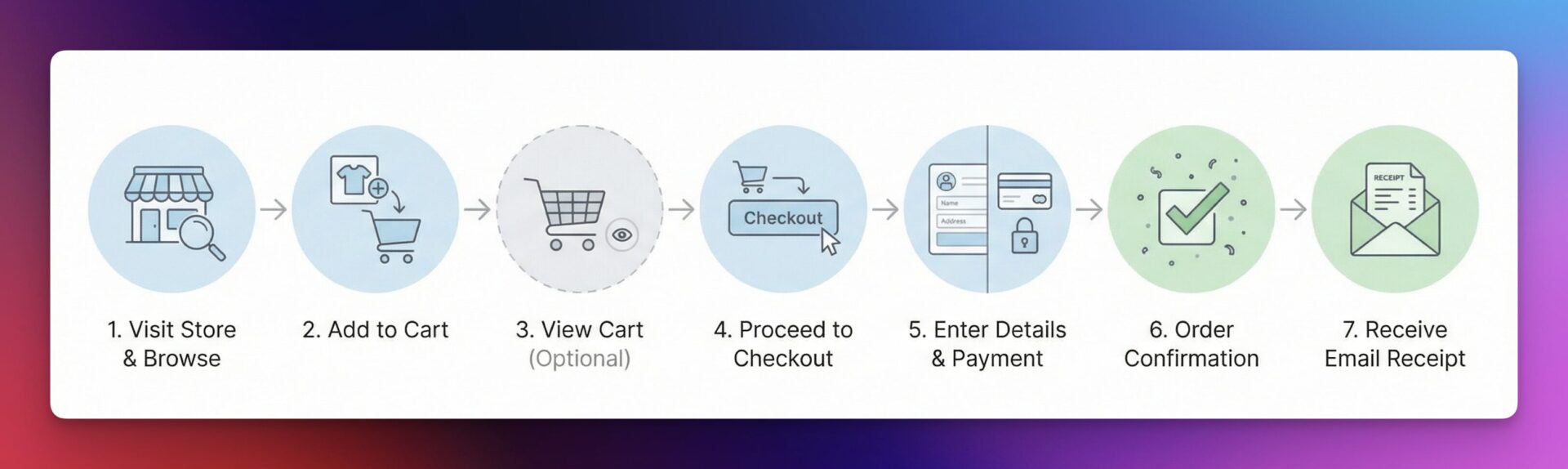
In fact, the average WooCommerce checkout is 5.1 steps long and 11.3 form fields according to a research by Baymard Institute. Every extra step, unnecessary field, and unnecessary instruction introduces doubt, and doubt is the enemy of conversions.
Optimizing your checkout is about removing friction, reducing cognitive load, and guiding shoppers through a sequence that feels natural rather than demanding. A well-thought out checkout focuses only on what is essential for completing the order and gives trust signals.
In eCommerce, the simplest path is usually the most profitable, and a clean checkout flow is where that principle matters most.
Hack #3: One-Page Checkout
Going through 2-3 steps just for checkout loses customers. They wander off, never to return to the checkout.
A one page checkout removes the friction and cognitive load of multi step funnels, and replaces it with a focused path that keeps customers moving.
Rethink the details you’re asking the customers to fill up, and ask for the ones that are absolutely necessary. Put all billing, shipping, payments, order summary, and confirmation on a single page.
Hack #4: Express Payments & Buy Now, Pay Later (BNPL)
One of the easiest ways to increase WooCommerce sales is to make it super easy for customers to pay. Express payment options like Google Pay, Apple Pay, and PayPal, as well as Buy Now Pay Later services like Klarna, Affirm, and Afterpay helps with this exact thing.
Research also suggests that by introducing a BNPL option, the users are more likely to purchase, and the average order value increases by about 10%.
These payment options remove two of the biggest barriers in eCommerce – time & availability. When shoppers complete a purchase, the entire checkout feels instant. It is about matching modern buying behavior where flexibility, control, and financial comfort matter as much as the product itself.
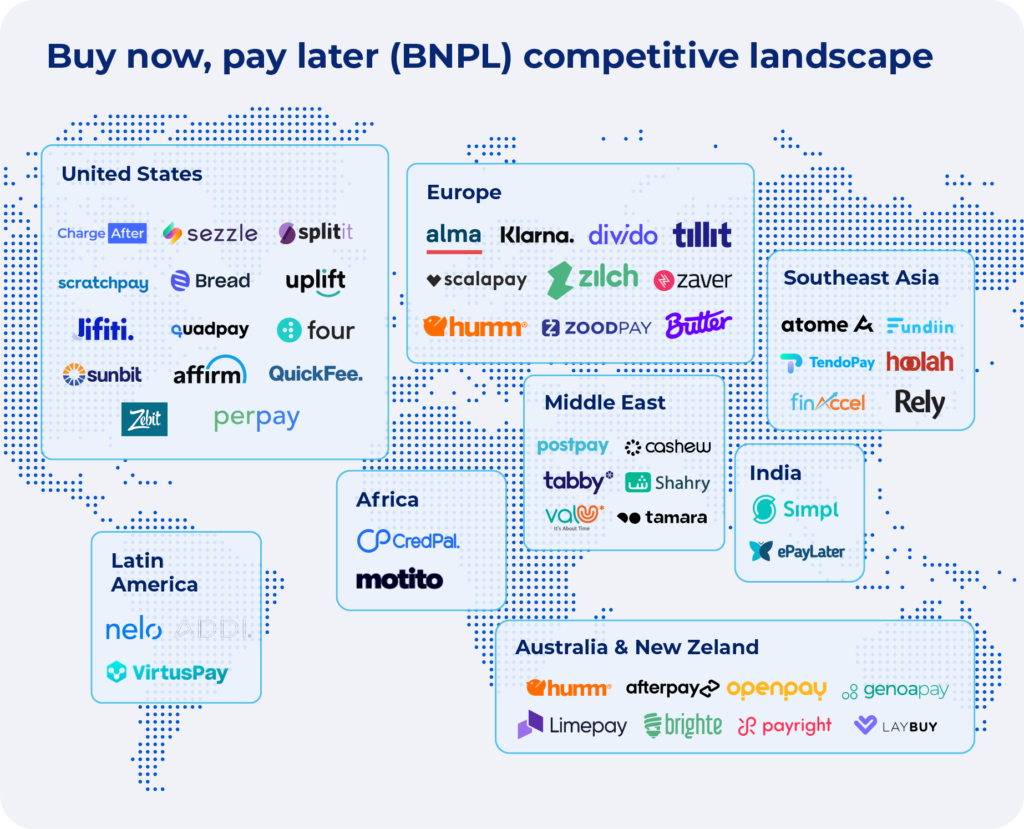
When stores offer both express payments and BNPL, they create a checkout experience that feels fast, flexible, and low risk. Customers feel more in control, cart abandonment drops, and higher priced items become far easier to justify.
In competitive markets, these payment upgrades are not luxuries. They are conversion tools that directly influence revenue the moment they are activated.
Hack #5: Eliminate Surprise Costs
Did you know, 39% of cart abandonment happens due to surprise costs at checkout. Things like shipping, taxes, and fees that the customer didn’t expect.
Customers usually move through the funnel with a price in mind, and any surprise cost adds extra resistance, motivating them to skip the purchase.
The solution to this is ensuring proper transparency in your store. Communicate all the costs early, and never hide additional fees behind a wall.
If you offer free shipping over certain amount of order value, ensure that it is properly visible. Features like the Dynamic Free Shipping Bar in StoreGrowth can help you in this regard.
When pricing is predictable, customers feel respected rather than manipulated. They make decisions confidently rather than cautiously. Eliminating surprise costs does not mean lowering your prices. It means presenting them openly so nothing feels like a last minute penalty.
This single change can significantly increase WooCommerce sales, reduce abandonment and increase completed orders because shoppers value honesty as much as they value savings. A transparent checkout is a high converting checkout, and clarity in cost presentation is one of the simplest ways to turn hesitation into completion.
Hack #6: Optimize Mobile Checkout
Mobile shoppers abandon their carts at far higher rates, and research shows that more than 80 percent of this drop off is caused by UX friction, not by pricing or product hesitation.
The mobile checkout experience needs to feel simple, stable, and effortless, because even the smallest inconvenience on a phone is enough to disrupt buying intent.
Start by keeping the primary call to action visible at all times.
Mobile users have limited patience and limited screen space, and every unnecessary field increases friction. When you streamline mobile checkout with these principles, completion rates typically improve by fifteen to twenty five percent because shoppers experience clarity instead of effort.
A well optimized mobile checkout is not a nice to have. It is the difference between a store that loses buyers and one that converts them seamlessly.
Hack #7: Cart Recovery Emails
Cart recovery email sequences is one of the most popular ways to reclaim lost sales. These users are already warm; so reaching back out to these customers can help recover them.
Industry data shows that more than 260 billion dollars in lost orders are recoverable with stronger recovery systems. These are not cold leads or casual browsers.
Abandoned cart emails alone generate an average of forty five dollars for every one dollar spent, making them one of the most profitable systems any store can run.
A simple reminder email sequence brings shoppers back to the exact point where they left off and helps them finish the purchase with clarity and confidence.
Instead of treating abandoned carts as wasted traffic, view them as delayed sales that only need a nudge. When you build a consistent recovery process, lost revenue turns into easy wins.
Hack #8: SMS
SMS is one of the most powerful recovery channels for high intent shoppers because it reaches customers instantly.
With a 98% open rate and 90% of messages read within three minutes, SMS outperforms email by a wide margin.
It also converts about 25% higher than abandoned cart emails and costs almost nothing to send, usually a few cents through providers like Twilio.
SMS works best for high value carts where the shopper has already shown strong purchase intent. There is no reason to text someone who abandoned a twenty dollar order, but when the cart value passes two hundred dollars, the revenue potential easily justifies the channel.
A simple message sent about forty five minutes after abandonment is often enough to interrupt the customer’s day and pull them back into the buying flow. A concise template such as “Your item is waiting, complete your order here” with an auto applied link helps them return without friction.
SMS works because it delivers immediacy and clarity, two ingredients that shorten hesitation. When used selectively and respectfully, it becomes a low cost, high return system for recovering premium orders that might otherwise disappear.
Hack #9: Exit-Intent Popups
Exit intent popups are your last chance to save a shopper who is moments away from leaving. When implemented well, they do not feel intrusive. They feel timely, relevant, and helpful.
The moment a user’s cursor moves toward the browser bar or the back button, you can trigger a targeted offer or reminder that gives them a reason to reconsider.
Offer something meaningful such as a limited time discount, a free shipping threshold reminder, or a reassurance like hassle free returns.
The goal is not to bribe the shopper. It is to address whatever friction was about to cause them to leave.
When used sparingly and aligned with the right offer, exit intent popups can significantly reduce abandonment and keep warm buyers engaged long enough to complete the purchase. They act as a gentle safeguard for revenue you were just about to lose.
Hack #10: Context-Aware Charm Pricing
You cannot change what a customer can afford with psychology. But you can change how a price feels in their head.
Charm pricing works because the brain reads prices from left to right and anchors on the first digit.
This is why $19.99 feels significantly cheaper than $20, even though the difference is one cent. The brain registers “19” first and downplays the decimals.
Charm pricing works best in contexts where shoppers are price aware or actively comparing options.
Use charm pricing for:
When pricing feels intentional rather than arbitrary, customers trust it more and hesitate less.
Hack #11: Decoy Effect in Bundles & Plans
The decoy effect works by introducing a third option that exists purely to make your preferred choice look better.
Instead of pushing customers toward a specific plan, you let comparison do the work.
Example:
Option C is intentionally bad value. It makes Option B feel like an obvious deal, and most customers gravitate toward it without feeling pressured.
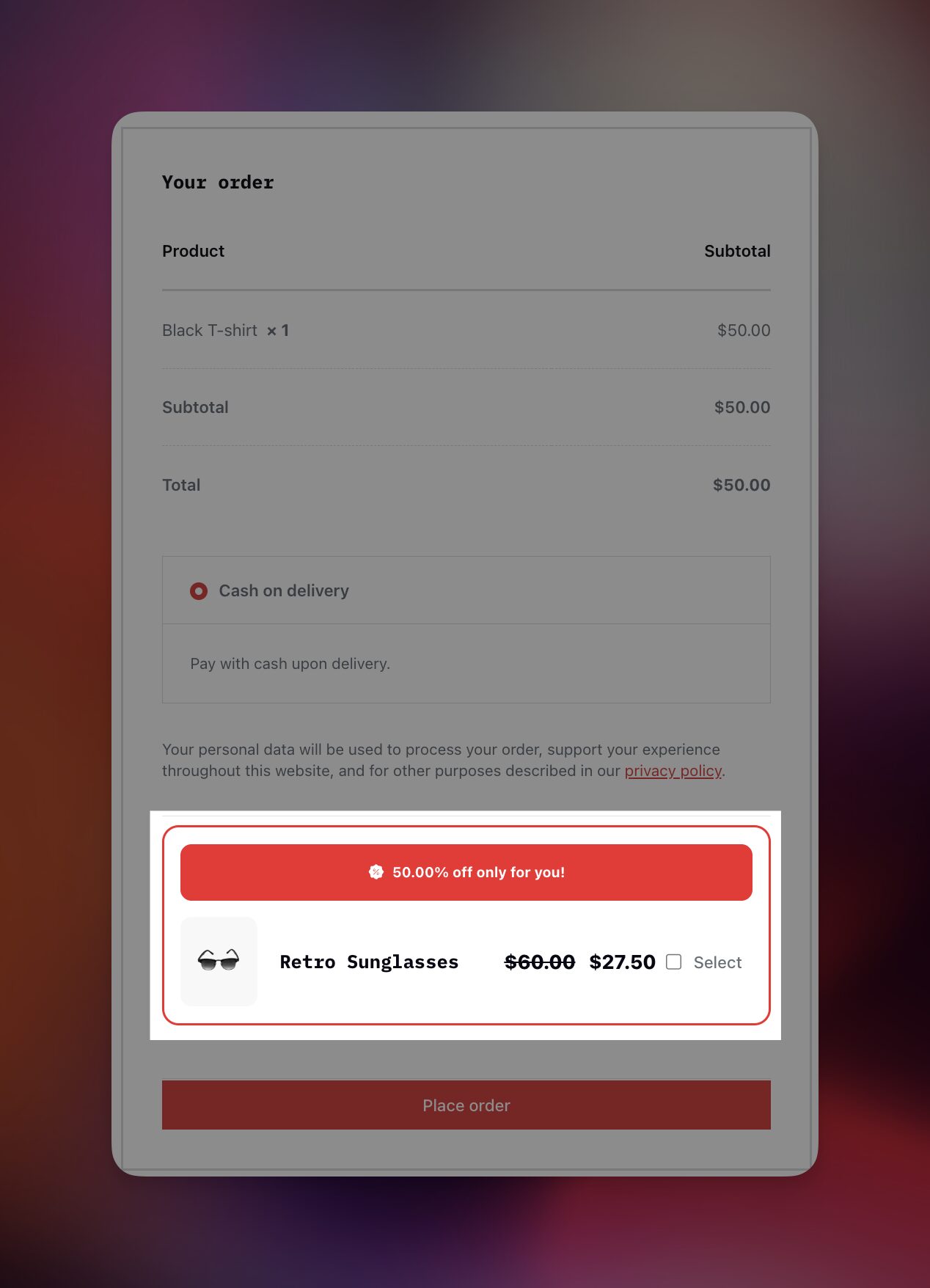
With StoreGrowth, you can place custom upsell order bumps or BOGO deals on specific products, and introduce a decoy offer to make your preferred choice look better than it actually is.
The decoy should feel plausible, not manipulative. When done correctly, customers feel smart for choosing, not tricked into buying more.
Hack #12: Price Anchoring
Customers do not evaluate prices in isolation. They compare everything to the first number they see.
If the first product on a category page costs $1,200, the $400 option below feels affordable. If the first product costs $80, that same $400 product suddenly feels expensive.
You can use this without changing any pricing.
Simple ways to apply anchoring:
- Set default sorting to Price: High to Low for curated or premium categories
- Place halo or flagship products at the top of category pages
- Position mid-range, high converting products immediately below premium ones
Anchoring only works when it feels believable. Using extreme outliers in a low priced store can backfire and damage trust.
When done right, anchoring reframes value quietly. Customers feel like they are making a smart decision rather than being pushed toward one.
Hack #13: Introduce Scarcity
Customers are smarter than most stores assume. Fake countdown timers, permanent low stock messages, and urgency that resets every day no longer work. In fact, they damage trust once shoppers notice the pattern.
Real scarcity works because it reflects actual demand and availability. Showing low inventory when stock is genuinely running out, displaying how many people are viewing a product, or highlighting that others currently have the item in their cart creates urgency without deception.
The key difference is authenticity. Scarcity should be tied to real inventory, real activity, or real time-bound offers such as flash sales or seasonal promotions. When urgency is believable, it accelerates decisions. When it feels manufactured, customers hesitate or leave entirely.
Use scarcity as a signal, not a trick. When shoppers believe they might miss out, action follows naturally.
If you’re wondering, here are 5 of the best Countdown Timer plugins that you can use in your WooCommerce store.
Hack #14: Show The Savings
How you present savings matters as much as the discount itself. Customers respond more strongly to concrete dollar savings than abstract percentages.
Saving $15 feels more tangible than saving 15%, even when the value is identical. Dollar amounts are easier to visualize and feel more real, especially for mid-range products where customers already understand the base price.
This works particularly well in carts, checkout summaries, and promotional messaging. Highlighting You save $30 today or Total savings $45 reframes the purchase as a win rather than an expense.
The product price stays the same. The psychology shifts. When customers clearly see what they are gaining, hesitation drops and confidence increases.
Hack #15: Frequently Bought Together
Once a customer has decided to buy, increasing order value becomes easier. The hesitation is gone. The trust is already there.
Frequently Bought Together works because it prevents customers from forgetting something important.
When someone adds a product to cart, they are focused on that single item. They are not thinking about accessories, replacements, or complementary items they might need later.
For example, someone buying a DSLR camera already expects to need a memory card and an extra battery. Showing those items together feels natural. It reduces friction and saves them from a second purchase later.
The key is relevance. Frequently Bought Together should be based on real purchase behavior, not guesswork. When the products make sense together and are presented as a convenience rather than a push, customers are far more likely to add them.
A modest incentive such as a small discount or a message that frames the bundle as a complete setup is often enough. When implemented correctly, this approach commonly increases average order value by twenty to thirty percent on relevant products without affecting conversion rates.
If you want to learn more about product bundling, feel free to go through our expert guide on What are Product Bundles in WooCommerce .
Hack #16: Post-Purchase Upsells
The moment after payment is completed but before the thank you page is shown is one of the most powerful moments in eCommerce.
The customer has already committed. Their buying momentum is high and asking for one additional decision feels easy rather than exhausting.
Instead of immediately showing the thank you page, you can present a simple one click upsell order bump. The customer can accept it instantly without re entering payment details, and the order is updated automatically.
This only works when the offer is highly relevant. An upgrade, an extra unit, or a perfect add on fits naturally at this stage. The discount should feel meaningful, not symbolic, and the experience should remain fast and simple.
This is not a place for complexity. One or two offers are enough. When done cleanly, post purchase upsells often see acceptance rates between ten and twenty percent because the intent to buy is still strong.
Hack #17: Upsells Across the Funnel
Upsells and cross sells should not be concentrated in a single step.
They work best when spread naturally across the entire shopping experience. Each placement plays a different role and meets the customer at a different level of intent.
On WooCommerce product pages, suggestions help shoppers discover relevant additions early. In the cart, subtle reminders catch items they may have overlooked. During checkout, small optional add ons feel like final touches rather than commitments. After the purchase, upgrades and extras feel like bonuses.
Follow up emails then reinforce the experience by recommending accessories once the product has arrived.
Hack #18: Building a Review Engine
Reviews go a long way when ensuring customers trust and buy from your platform.
Most stores treat reviews as a one time feature. High converting stores treat them as an engine.
Reviews should be collected automatically, not manually chased. A request should be triggered a few days after delivery, when the product has actually been used.
The form should be simple, quick to complete, and easy to access from any device.
A small but real incentive often helps. Store credit, reward points, or a modest discount on a future order is usually enough to motivate action without cheapening the feedback.
Where reviews are displayed matters just as much as collecting them. Overall star ratings should appear above the fold. Review counts should be visible so shoppers understand the sample size. Filters help buyers find feedback that looks like their own use case.
A mix of short comments and detailed reviews builds credibility.
Hack #19: Social Proofs
Social proof should not live only on the product page.
Shoppers move through your store looking for reassurance at multiple stages. Each time doubt appears, social proof can quietly remove it.
On category pages, review counts and top rated indicators help narrow choices. On the home page, bestsellers and testimonials validate the brand itself.
During checkout, small reassurance snippets confirm that the shopper is making a safe decision. In emails, short quotes or screenshots reinforce credibility long after the site visit ends.
Structured review markup also plays a role. When reviews are marked up correctly, star ratings can appear directly in search results. This increases click through rates before the shopper even reaches your store.
The goal is not to overwhelm. It is to place proof exactly where decisions are being made.
Hack #20: Real-Time Activity Notifications
Real time activity notifications work because they mirror real world shopping behavior.
When people see that others are viewing, buying, or considering the same product, it reduces hesitation. It signals demand and creates momentum without forcing urgency.
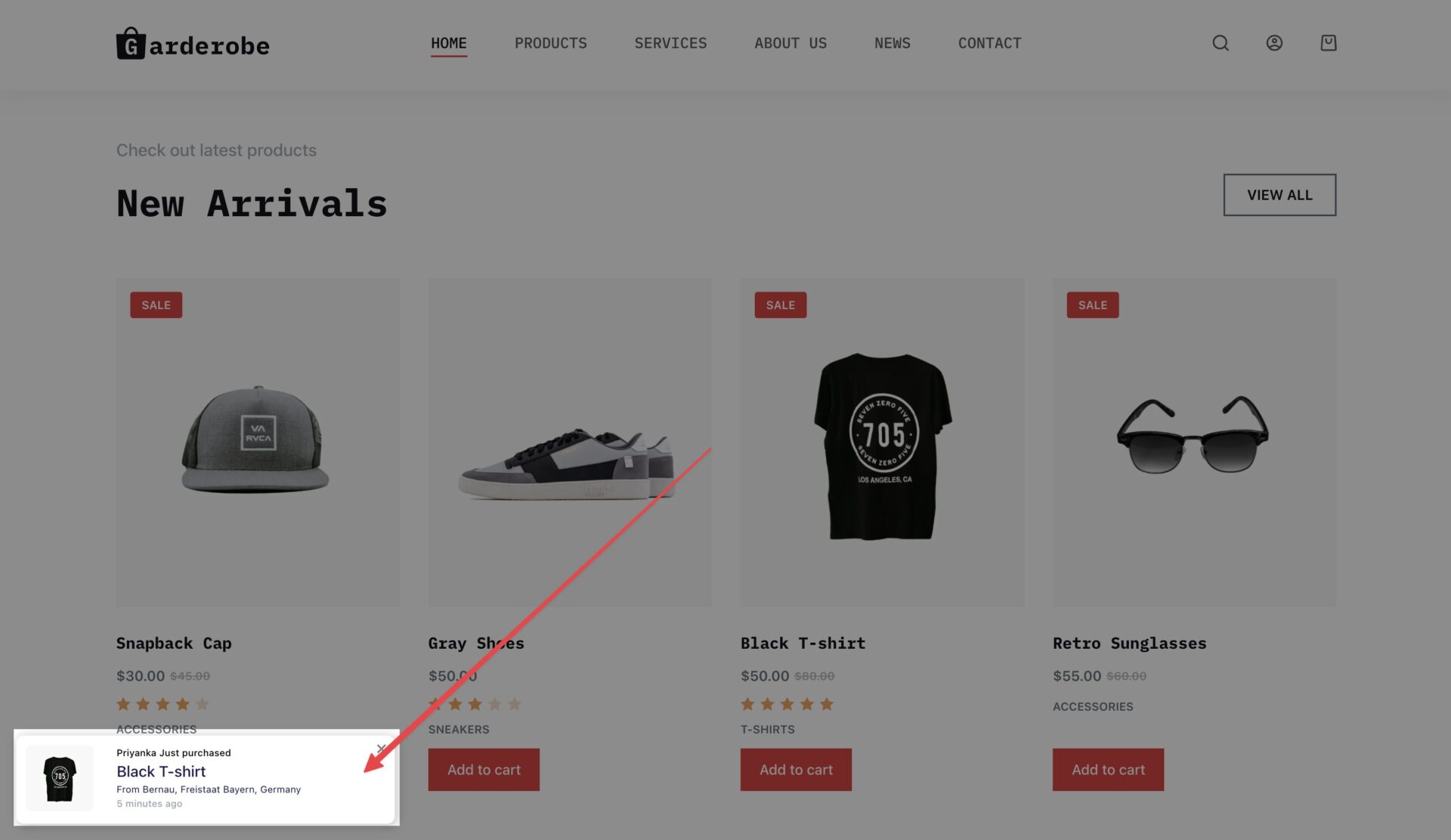
Messages like someone recently purchasing an item, a number of people viewing it, or limited stock combined with active carts all reinforce the idea that the product is desirable and moving.
These cues must remain subtle. Notifications should appear occasionally, not constantly. They should be based on real data, not fabricated scripts that never change. Shoppers should also be able to dismiss or mute them if they choose.
When used responsibly, real time activity adds confidence rather than pressure. It nudges shoppers forward by showing them they are not alone in their decision.
Questions About How To Increase WooCommerce Sales, Answered
How can I increase WooCommerce sales without increasing ad spend?
You can increase WooCommerce sales by improving conversion rate rather than traffic. This includes speeding up your store, optimizing checkout, removing surprise costs, adding trust signals, recovering abandoned carts, and increasing average order value through upsells and bundles. Small improvements in conversion often outperform additional ad spend.
Why is my WooCommerce store getting traffic but not converting?
Most WooCommerce stores fail to convert due to user friction. Common issues include slow page speed, lack of trust signals, complicated checkout flows, unexpected fees, limited payment options, and poor mobile experience. Auditing these areas usually reveals the biggest conversion blockers.
What are the most important WooCommerce conversion rate
The highest-impact tactics include improving site speed, simplifying checkout to one page, enabling express payments and BNPL, eliminating surprise costs, adding strong social proof, and implementing abandoned cart recovery. These fundamentals consistently drive measurable conversion gains.
How important is page speed for WooCommerce conversions?
Page speed is critical. Even a few seconds of delay can significantly reduce conversions. Faster WooCommerce stores see lower bounce rates, higher engagement, and higher revenue per visitor, especially on mobile where patience is limited.
How do abandoned cart emails help WooCommerce stores?
Abandoned cart emails reconnect with shoppers who already showed high purchase intent. When timed correctly and written clearly, they recover a meaningful percentage of lost orders and generate one of the highest returns on investment of any eCommerce channel.
Do Buy Now, Pay Later options really increase WooCommerce sales?
Yes. BNPL options reduce price friction, increase purchase confidence, and often raise average order value. Many WooCommerce stores see higher checkout completion rates and larger basket sizes after enabling BNPL alongside express payments.
What is the best way to increase average order value in WooCommerce?
The most effective methods include Frequently Bought Together bundles, one-click post-purchase upsells, checkout order bumps, and intelligent pricing strategies. These approaches increase order value without harming conversion rates when relevance is maintained.
How should WooCommerce stores use reviews to increase trust and sales?
Reviews should be treated as a system, not a feature. Automatically collecting reviews after delivery, making submission easy, displaying star ratings prominently, and responding publicly to negative feedback all help reduce buyer hesitation and increase conversions.
Are upsells and cross-sells bad for user experience?
Upsells hurt experience only when they are irrelevant or aggressive. When placed naturally and tied closely to the main product, they feel helpful rather than pushy. Relevant upsells often improve customer satisfaction while increasing revenue.
How long does it take to see results from WooCommerce optimization?
Some improvements, such as checkout simplification or payment upgrades, can show results within days. Others, like trust building and review growth, compound over weeks. WooCommerce optimization is most effective when approached as an ongoing process rather than a one-time fix.
Conclusion
High-converting WooCommerce stores share one common trait. They feel easy to buy from.
They load fast. They answer questions before they are asked. They remove doubt at every step. They respect the customer’s time, attention, and intent.
The strategies we discussed in this blog are not shortcuts to achieving higher WooCommerce sales. They are fundamentals. You do not need to implement all hacks at once. Even a handful of improvements in the right places can materially change your store’s performance.
If you focus on that single principle and apply these ideas gradually, your store will not just convert better. It will grow more predictably, more sustainably, and with far less reliance on paid traffic.
Progress beats perfection. Start with the weakest point in your funnel and improve it. Then move to the next.
That is how the best WooCommerce stores scale!
Leave a Reply
You must be logged in to post a comment.