



Running a WooCommerce store in 2026 isn’t easy. Between managing orders, handling support tickets, processing returns, and keeping inventory in check, daily operations can quickly become overwhelming.
As your store grows, so do repetitive tasks. Many store owners try to solve this by hiring virtual assistants, but that often leads to higher costs and more complexity.
There’s a better solution to this exact problem: AI automations in WordPress. Thanks to recent advancements, AI can now handle time-consuming tasks like writing product descriptions, responding to support messages, optimizing SEO, managing inventory, and more.
In this guide, we’ll break down what AI automation in WordPress really means, which WooCommerce tasks you should automate, and how to implement them to scale your store efficiently.
What are AI Automations?
If you’ve ever used tools like Zapier, Make, or IFFTT you have first-hands experience with automations. AI automations are the workflows that uses triggers, rules, and AI models to handle tasks within your WordPress or WooCommerce site without manual effort.
Instead of you writing product descriptions, sorting data, replying to customers, or updating content, the AI steps in and does the work for you. Think of it as upgrading WordPress from a passive CMS into an active assistant that can interpret information, make decisions, and execute actions – all based on how your store operates.
When a customer places an order, when a product is added, when stock runs low, or when a ticket arrives, AI automations can react instantly and intelligently.
Understanding AI automations require you to know the components of any automation. Knowing this will help you set proper automations that performs the task with utmost perfection.
Automations using AI can be divided into four moving parts:
In essence, AI automation adds an intelligent layer to traditional automation rather than simple if this → then that.
Example:
You publish a new product in your WooCommerce store. This triggers the automation, which asks the AI agent to generate product description, SEO title & meta description, short social post, and email blurb.
Another automation can add the product to the ‘New Arrivals’ section and also add it to the email newsletter.
This saves a couple hours for each product, and you can focus on more important tasks to scale your business.
7 Practical Use Cases of AI Automations in WordPress & WooCommerce
AI automations are most powerful when applied to real tasks you handle every day.
Whether you manage a blog, run a WooCommerce store, or support multiple clients, these seven practical use cases show exactly how AI can save time, reduce effort, and boost performance.

1. Product Content Creation
Creating product content is one of the most repetitive and time-consuming tasks for any WooCommerce store.
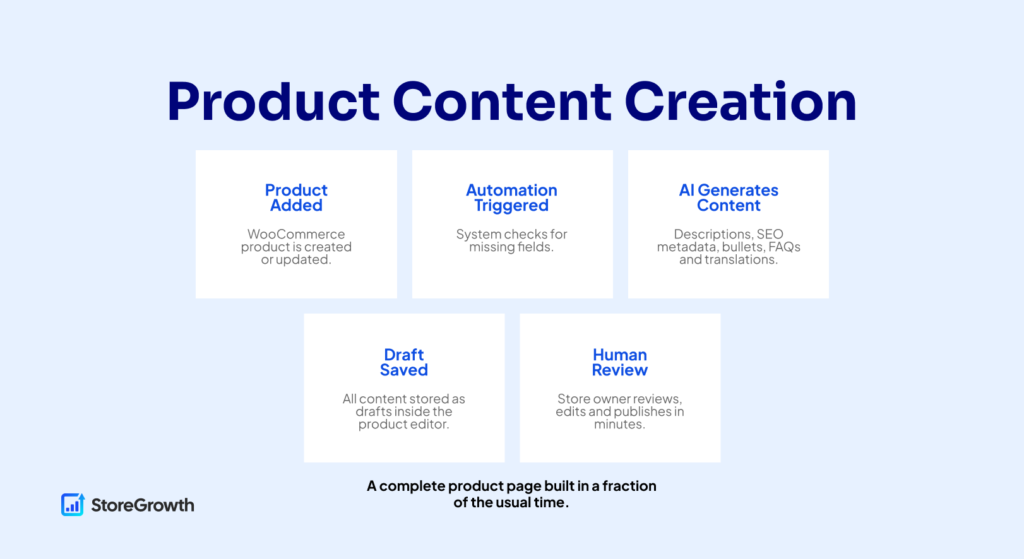
AI automations turn this into a smooth, semi-automated workflow by generating the core pieces of product content the moment a product is created. Instead of manually writing titles, descriptions, SEO metadata and FAQs, you start with complete drafts that only need light editing before publishing.
AI can generate everything a product page typically requires: clear titles, long and short descriptions, benefit-focused bullet points, SEO-optimized metadata, product FAQs and even translations. This not only speeds up your workflow, but helps maintain consistency across your catalog as it grows.
Below is a breakdown of how this automation works in practice.
Triggers
The automation begins the moment a new product is created or published in WooCommerce.
This can also be extended to run when:
Triggers tell the system when to activate the workflow.
Logic
When automating product content, the logic step helps to understand which condition to run through.
Examples of useful conditions include:
Logic prevents the AI automation from overwriting existing content and keeps you in control.
AI Agent
Once triggered, the AI agent handles content generation for the specific tasks.
It can produce:
The AI’s role is to remove the blank-page problem and give you structured, usable drafts within seconds.
The Automation Workflow
A typical content generation workflow automation looks like this:
This process keeps quality high while eliminating unnecessary manual work.
Tools You Need For This Automation
To automate your product content creation, you can use any of these tools:
You can use whichever AI agent (Gemini, Claude, ChatGPT, or other models) that fit your budget and your requirements. Be sure to check the comparison between each model during your selection process.
2. SEO Automation & GEO Optimization
With the rise of AI-powered search engines, like ChatGPT Search, Perplexity, Gemini-powered results, and Google’s AI Overviews, websites now need to be optimized not just for Google, but for generative engines that rely on structured, well-organized, frequently updated content.
This is where AI SEO automations become incredibly useful. Instead of manually updating meta titles, rewriting descriptions, generating schema, or adding internal links for every post, you can automate the heavy lifting.
AI can review existing content, spot missing fields, generate metadata, and ensure your pages stay optimized for both traditional SEO and GEO (Generative Engine Optimization).
AI SEO automation helps you maintain consistency, reduce manual mistakes, and optimize at scale—especially if you produce a lot of content or run a WooCommerce store with many product pages.
Below is how this automation works in practice.
Triggers
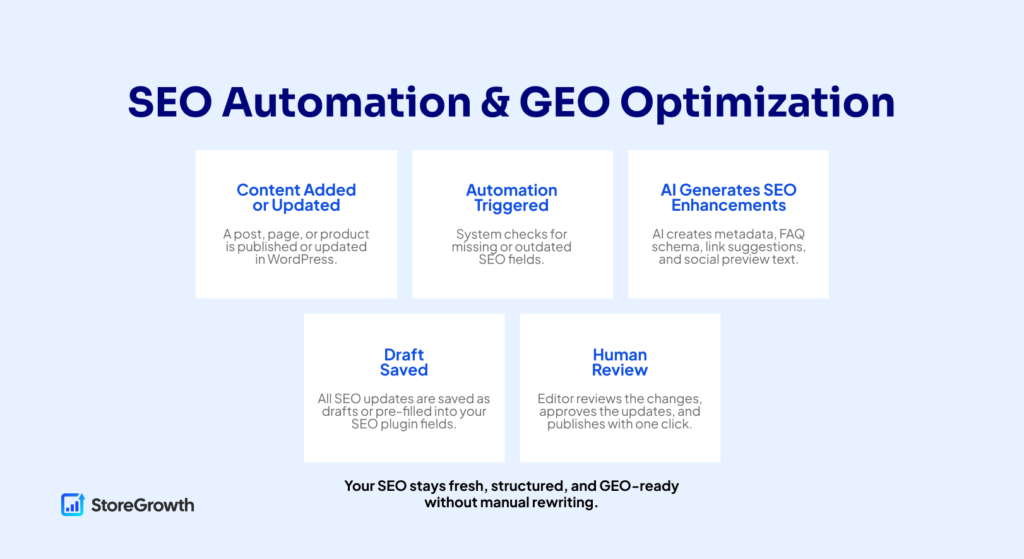
AI-powered SEO automations typically begin when:
These triggers help ensure new and existing content stays continuously optimized without waiting for manual intervention.
Logic
Logic determines when the automation should actually run. Useful conditions include:
Logic prevents unnecessary rewrites and keeps the AI focused on pages that actually require optimization.
AI Agent
The AI agent handles all the SEO tasks that normally slow teams down.
It can generate:
The AI can also analyze the content’s intent and semantic coverage, helping the page rank better not only in Google, but also in AI-driven search experiences.
AI’s job is not to replace full SEO strategy – but to automate the repetitive, mechanical tasks that make SEO consistent across your site.
The Automation Workflow
A typical SEO automation workflow looks like this:
This ensures your content stays optimized without requiring manual edits each time a change occurs.
Tools You Need for This Automation
To automate your SEO workflows, you can use:
When selecting the AI model, look for one that handles structured outputs well, since SEO metadata and schema often require specific formatting.
3. Customer Support Automation
Customer support is one of the most time-consuming part of running an eCommerce store. Most questions are repetitive – things like shipping information, return policies, prices, product compatibility, order status, account issues, or basic troubleshooting.
Automating the support within your store can help dramatically by handling these routine questions instantly, summarizing long messages, classifying tickets, and routing complex issues to the right human agent.
Instead of spending hours each week replying to the same questions, you can create a system where AI handles the first layer of support.
This not only reduces your workload, but also improves response times and keeps customers satisfied.
AI support automations don’t replace human agents; they filter, streamline, and prepare information so your team can focus on the cases that genuinely require human attention.
Below is how this automation works inside a WordPress or WooCommerce environment.
Triggers
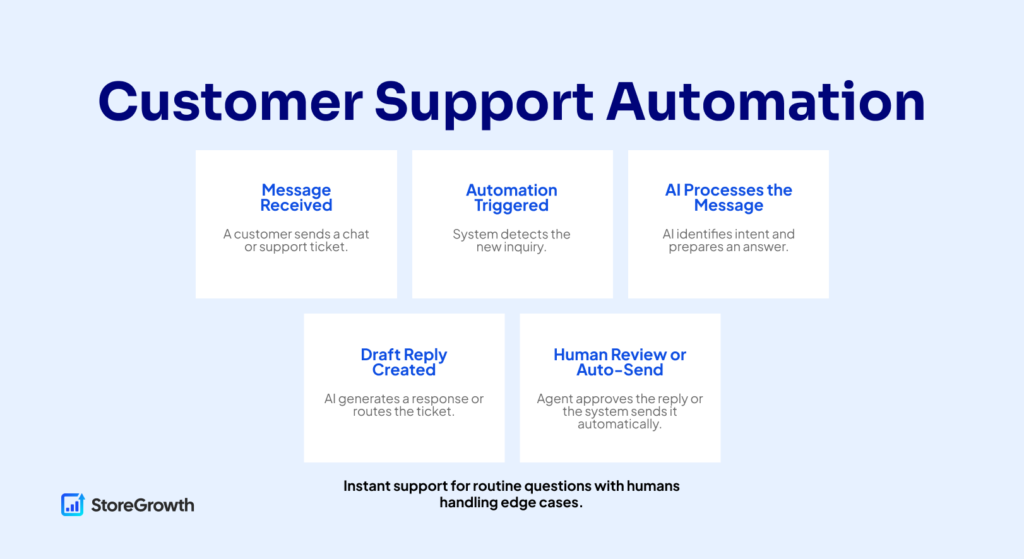
AI-powered support workflows usually start when:
These triggers allow the AI to step in immediately, reducing response delays and collecting context before a human takes over.
Logic
Logic defines how the automation decides what to do next.
Useful conditions include:
Logic ensures AI answers only when appropriate and passes edge cases to humans.
The Automation Workflow
A typical customer support automation works like this:
This gives customers faster responses while reducing support team workload.
Tools You Need for This Automation
Below are tools that are specifically capable of delivering AI-powered customer support, automated ticket handling and intelligent chatbot responses for WordPress and WooCommerce:
Choose an AI model that excels at natural conversation, tone adaptation and long-context understanding because customer support automation relies on clarity, empathy and accurate information retrieval.
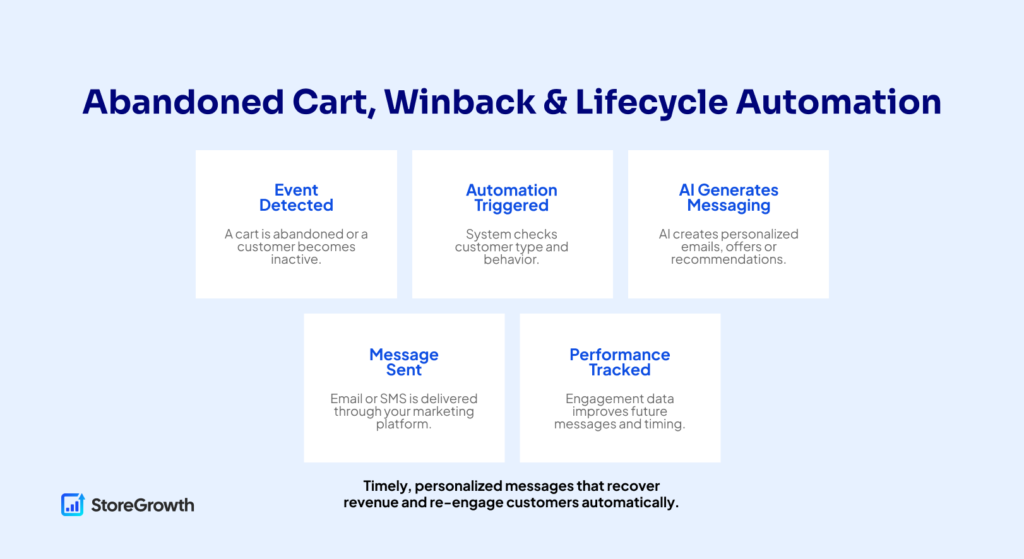
4. Abandoned Cart, Winback & Lifecycle Automation
Recovering abandoned carts and re-engaging inactive customers are some of the highest-leverage automations you can set up for a WooCommerce store.
Shoppers leave carts for many reasons, including distraction, uncertainty, shipping cost surprises, or simply forgetting.
AI automations help close this gap by creating personalized recovery messages, adjusting tone based on customer behavior, and recommending products that match the shopper’s interest.
Beyond cart recovery, AI can also automate lifecycle messaging like thank-you notes after purchase, follow-up emails, winback sequences, review requests, VIP offers, and reactivation campaigns.
Instead of writing variations for every audience segment, AI generates tailored content automatically, ensuring your messaging feels relevant and timely without additional manual effort.
Below is a breakdown of how these automations work in real WooCommerce environments.
Triggers
These automations usually begin when:
Triggers allow the automation to respond at the moment when engagement is most effective.
Logic
Logic helps decide which messages to send to which customers.
Useful conditions include:
With good logic, you avoid sending irrelevant or redundant messages and maintain a high-quality customer experience.
AI Agent
The AI agent handles all content generation and personalization within these flows.
It can generate:
AI ensures that every customer receives a message that feels tailored to them, rather than generic.
The Automation Workflow
A typical abandoned cart or lifecycle automation works like this:
This creates a responsive, personalized communication system that adapts to each customer’s journey.
Tools You Need for This Automation
Below are tools that are specifically capable of delivering AI-powered abandoned cart recovery, winback flows and lifecycle automations for WooCommerce:
Choose an AI model capable of generating personalized, behavior-aware content and reasoning through purchase patterns since lifecycle automation relies heavily on tone control, product relevance and understanding user intent.
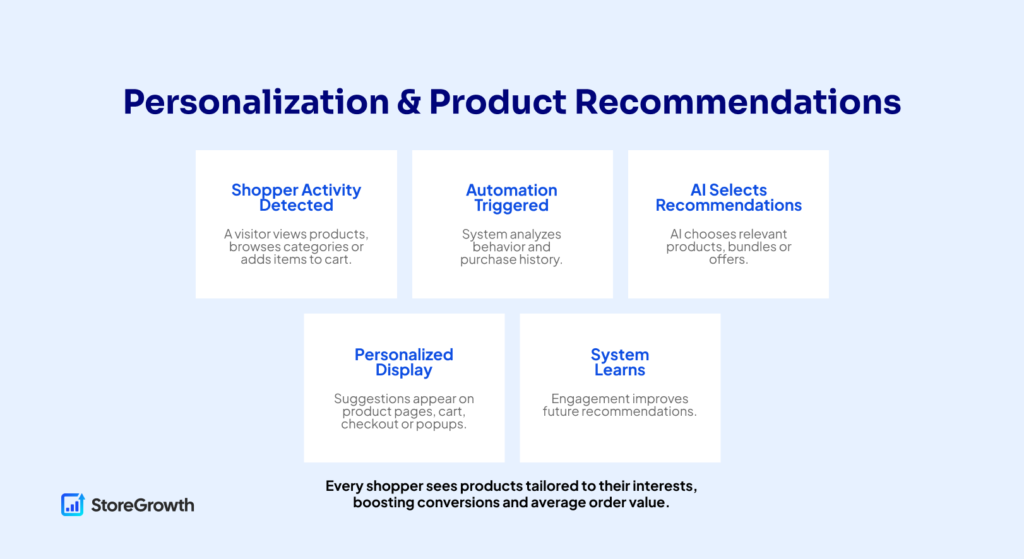
5. Personalization & Product Recommendations
Personalization is one of the most powerful ways to increase conversions, improve average order value and create a shopping experience that feels genuinely helpful rather than generic.
In traditional WooCommerce setups, personalization is usually limited to rules like “customers who bought X may like Y,” which is shallow and often irrelevant.
AI fundamentally changes this by analyzing real user behavior. For example, what people view, what they return to, which categories they browse, past purchases, session patterns and even micro-signals like dwell time.
AI-powered recommendation systems use these insights to show the right products to the right person at the right moment. This includes personalized BOGO offers, upsells, cross-sells, dynamic category highlights, tailored offers and on-site messaging that adapts to each shopper.
Instead of manually configuring dozens of rules, you let AI detect patterns and serve products your shoppers are more likely to buy.
Below is how this automation works inside a WordPress or WooCommerce environment.
Triggers
Personalization automations typically begin when:
These triggers give the system real-time signals about what the shopper is interested in.
Logic
Logic is where the system decides which type of recommendation to display.
Common conditions include:
With smart logic, you avoid irrelevant recommendations and keep the experience helpful.
AI Agent
The AI agent handles the part that rules cannot: understanding patterns in behavior.
The AI can:
Instead of manually choosing what to display, AI reasons through real behavior and chooses for you—similar to the logic used by major retail platforms.
The Automation Workflow
A typical personalization workflow looks like this:
This creates a feedback loop where recommendations improve over time.
Tools You Need for This Automation
Below are tools that are specifically capable of delivering AI-powered personalization, behavioral segmentation and dynamic product recommendations for WooCommerce:
Choose an AI model that performs well with pattern recognition, behavioral analysis and multi-step reasoning , such as Claude, ChatGPT 4-series, or Gemini, since personalization relies on interpreting user intent, affinity patterns and product relationships accurately.
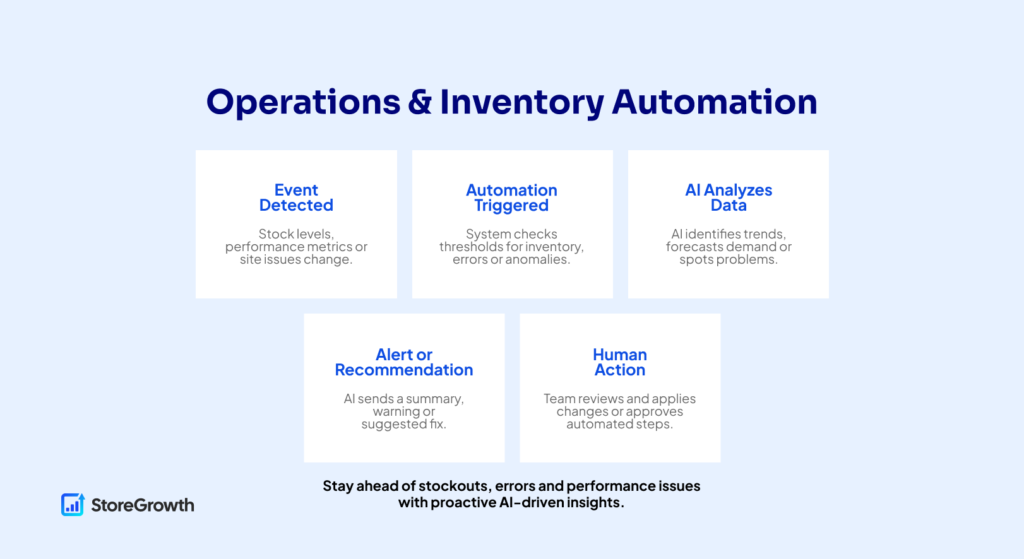
6. Operations & Inventory Automation
Behind every successful WooCommerce store is an ongoing layer of operational work that most customers never see: tracking inventory, monitoring site health, checking for broken layouts, reviewing logs, identifying anomalies, and making sure the store runs smoothly during traffic spikes or sale periods.
Doing all of this manually is exhausting and can cause errors. AI automations help by turning operational tasks into proactive, self-maintaining systems.
AI can forecast low stock, detect unusual sales patterns, recommend reorder quantities, identify broken pages or layout shifts, summarize system logs and flag issues before they become customer-facing problems.
In more advanced setups, AI agents can even prepare automated fixes or alert your team with step-by-step recommendations. The goal is not to replace human oversight but to reduce the time you spend on repetitive checks and give you early warning when something needs attention.
Below is how operational and inventory automation works on a WordPress or WooCommerce site.
Triggers
Operational and maintenance automations usually begin when:
Triggers allow the system to react immediately instead of waiting for a human to notice a problem.
Logic
Logic determines how the workflow interprets the trigger.
Useful conditions include:
Logic ensures that only meaningful issues are escalated and avoids noise.
AI Agent
The AI agent provides the thinking layer for operations.
It can:
The Automation Workflow
A typical operations automation works like this:
This workflow reduces downtime, improves stability and catches problems early.
Tools You Need for This Automation
Below are tools that are specifically capable of delivering AI-powered operational monitoring, inventory forecasting and anomaly detection in WooCommerce:
Choose an AI model that excels at log summarization, anomaly detection and forecasting, such as Claude, Gemini or ChatGPT 4-series.
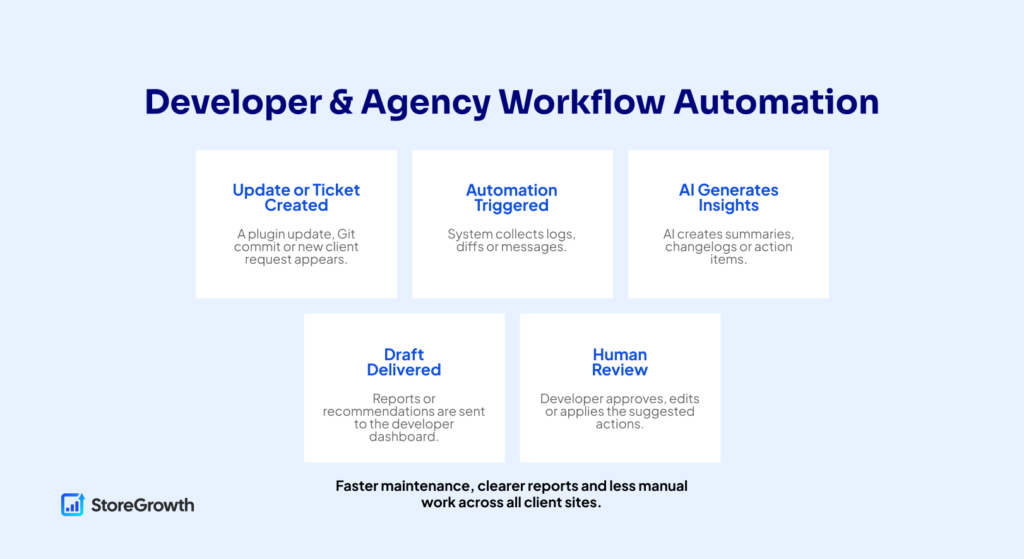
7. AI for Developers & Agencies
Developers and agencies spend a significant amount of time on repetitive technical tasks – writing boilerplate code, drafting documentation, preparing changelogs, analyzing diffs, summarizing client tickets, generating release notes, performing site audits, testing updates and producing monthly maintenance reports.
These tasks are essential but rarely require deep problem-solving, which means they’re perfect candidates for automation.
AI automations help by streamlining development workflows, generating technical content, assisting with testing, summarizing updates and even identifying potential issues in code or logs.
For agencies, AI can assemble update reports, compile analytics summaries, write onboarding documentation and create standardized automation packages for clients. This reduces manual overhead and frees up time for higher-value strategic work.
Below is how these automations work in practice.
Triggers
Developer- and agency-focused automations typically begin when:
These triggers help automate repetitive work that developers and agencies must perform regularly.
Logic
Logic determines which task is required and how to process it.
Useful conditions include:
Logic ensures that the right automation runs based on the event and the site’s service tier or maintenance plan.
AI Agent
The AI agent supports technical tasks by handling time-consuming but structured work, including
The AI agent becomes a technical assistant that accelerates workflows instead of replacing developers.
The Automation Workflow
A typical developer/agency automation looks like this:
This turns repetitive technical tasks into fast, consistent workflows with minimal manual effort.
Tools You Need for This Automation
Below are tools that are specifically capable of supporting AI-driven developer workflows, maintenance automations and agency reporting:
Choose an AI model capable of technical reasoning, code interpretation and structured reporting since developer-focused automations require accurate explanations rather than creative writing.
Why AI Automations Matter in 2026
We’re living in an era where AI is constantly evolving. Within the last few years, it has advanced from a tool to help with writing to a complete autonomous agent capable of writing code, helping with design, reviewing files, and even research new ideas.
In fact, 78% of companies already use AI in their workflows according to a latest research by Elementor. By introducing AI automation, you not only save on operational expenses, but also free up time to think about how to grow your business.

1. Workloads Are Increasing Faster Than Teams Can Keep Up
Nowadays, WordPress and WooCommerce sites face far more operational demands than they did even a year or two ago.
Stores must produce more content, publish more product variations, answer more support questions, manage more integrations, and maintain more SEO structure across dozens or hundreds of pages.
This level of work is simply too much to handle manually unless you hire a large team. AI automations bridge that gap by taking over repetitive tasks like writing descriptions, updating metadata, preparing campaign messages, or summarizing support tickets.
Instead of working harder, site owners can finally work smarter – letting automation handle the volume while they focus on strategy.
2. AI Search Engines Are Changing How People Find Your Site
Search in 2026 is no longer limited to Google or Bing. Platforms like ChatGPT Search, Perplexity, AI overviews, and Bing Copilot deliver instant, AI-generated answers.
These systems prefer websites that are structured cleanly, updated regularly, and written in a way AI can easily interpret.
This shift means that ‘set-and-forget’ SEO is no longer enough.
AI automations in WordPress help by continuously optimizing content, fixing outdated information, generating structured FAQ blocks, improving internal linking, and keeping your site GEO-friendly (Generative Engine Optimization).
Sites that automate these updates rise in visibility; sites that rely on manual SEO get left behind.
3. Customer Expectations Have Completely Shifted
With so many options readily available, modern shoppers expect instant responses, personalized recommendations, clear product information, and smooth checkout flows.
They are comparing your WooCommerce store not just to other small shops, but to Amazon, Shopify, and TikTok Shop – platforms that use AI extensively to shape user experiences.
AI automations in WordPress help level the playing field by answering common questions automatically, tailoring product suggestions based on behavior, adjusting messaging in real-time, and supporting dynamic campaigns.
By introducing AI automations, you can offer tailored experiences that feel polished and modern without needing enterprise-level resources.
4. Automation Reduces Costs and Improves Efficiency
With rising support loads, higher competition, and increasing marketing demands, operational costs for online stores continue to climb.
AI automations reduce these costs by eliminating manual labor on routine tasks, like copywriting, tagging, categorizing, routing tickets, rewriting content, or generating campaign assets.
What once required hours of human effort now takes seconds.
For small businesses, automation becomes the equivalent of hiring extra team members without increasing payroll. For agencies, it means serving more clients, faster, with consistent quality.
5. WordPress Itself Is Becoming AI-Native
The WordPress ecosystem is shifting toward deeper AI integration. Core features, block editor enhancements, and plugin ecosystems are moving toward AI-assisted content creation, automated maintenance, safer agent permissions, and even agentic workflows that can perform multi-step tasks.
This means AI automations won’t be optional add-ons – they will become the default way modern WordPress sites operate.
Adopting AI automations in WordPress early ensures your site is aligned with where the platform is going, not where it has been.

Frequently Asked Questions
AI is transforming how WordPress and WooCommerce sites are built, managed and scaled but it also introduces new concepts that many store owners and beginners are still learning to navigate. Let’s explore some most commonly asked questions about AI Automations in WordPress.
1. What are AI automations in WordPress?
AI automations in WordPress are systems that use triggers, conditions and an AI model to complete tasks automatically such as writing product descriptions, optimizing SEO, answering support questions or personalizing recommendations.
Instead of doing these tasks manually, WordPress runs them in the background based on rules you define.
2. Do I need technical skills to implement AI workflows?
A little bit, yes. Most AI automation tools for WordPress use visual builders, simple conditions and natural-language prompts.
If you can use plugins like WooCommerce, Rank Math or contact form builders, you can set up basic AI automations. More advanced workflows may require tools like Make.com or WP Webhooks, but even those are designed for non-developers.
3. Will AI automations replace my existing WordPress workflows?
Not immediately. AI automations are designed to support your workflow, not replace them. You still control triggers, conditions and approvals.
For example, AI may write a product description, but you can choose to save it as a draft until you approve it. Over time, as your confidence grows, you can automate more steps safely.
4. Can AI help with SEO automation in WordPress?
Yes. AI can generate SEO titles, meta descriptions, FAQ schema, internal link suggestions and GEO-optimized content for WordPress posts or WooCommerce products.
Paired with SEO plugins like Rank Math or AIOSEO, AI automations help keep your site consistently optimized without manually editing every page.
5. Can AI really improve customer support in WordPress?
Absolutely. AI can answer common pre-sale questions, summarize long support messages, classify tickets and route requests to the right team.
Instead of replacing support teams, AI reduces repetitive work so humans can focus on complex or sensitive cases. Many WooCommerce stores see faster response times and lower ticket volume after implementing AI support.
6. What tools do I need to start AI automations in WordPress?
Most stores use a combination of:
You can start small with simple workflows and expand as your needs grow.
Conclusion
AI automations in WordPress and WooCommerce are no longer experimental. They’re practical systems that help stores run faster, more consistently, and with fewer resources.
By automating content, SEO, customer interactions, and daily operations, AI gives you leverage that once required larger teams and bigger budgets. The key is to start small, build intentional workflows, and refine them over time.
When paired with StoreGrowth, AI automation becomes even more powerful. While AI handles efficiency and scale, StoreGrowth turns that momentum into conversions through urgency, social proof, and optimized checkout experiences.
The future of WordPress isn’t just about publishing content, it’s about running smarter, self-optimizing stores.
Start with one workflow, measure the impact, and grow from there. Best of luck!

Leave a Reply
You must be logged in to post a comment.