



Abandoned carts are one of the most frustrating problems in eCommerce. Customers come to your site, they find a product that they love, and they leave without completing the purchase.
In fact, over 70% of all carts are being abandoned.
But here’s the good news: reducing cart abandonment is not rocket science. Your customers want to be reminded. They’re often just distracted, not uninterested.
All it takes is a proper strategy and customer nudges with a sprinkle of exclusive offers.
In this blog, we’ll be going through 5 proven abandoned cart email templates specifically designed for WooCommerce stores, complete with timing strategies, copywriting techniques, and conversion tactics that actually work.
Let’s get started!
Why Your Default WooCommerce Emails Are Failing
Your default WooCommerce cart emails have one job, and they are terrible at it.
They are dry, robotic, and forgettable. They sound like a transaction, not a conversation. They have no personality, no brand voice, and worst of all, no urgency.
“You left items in your cart” is not a compelling reason to act.
It’s a passive statement. It doesn’t excite the customer. It doesn’t address their objections. It doesn’t give them a single, powerful reason to complete their purchase right now.
To win back a sale, you can’t just remind. You have to persuade.
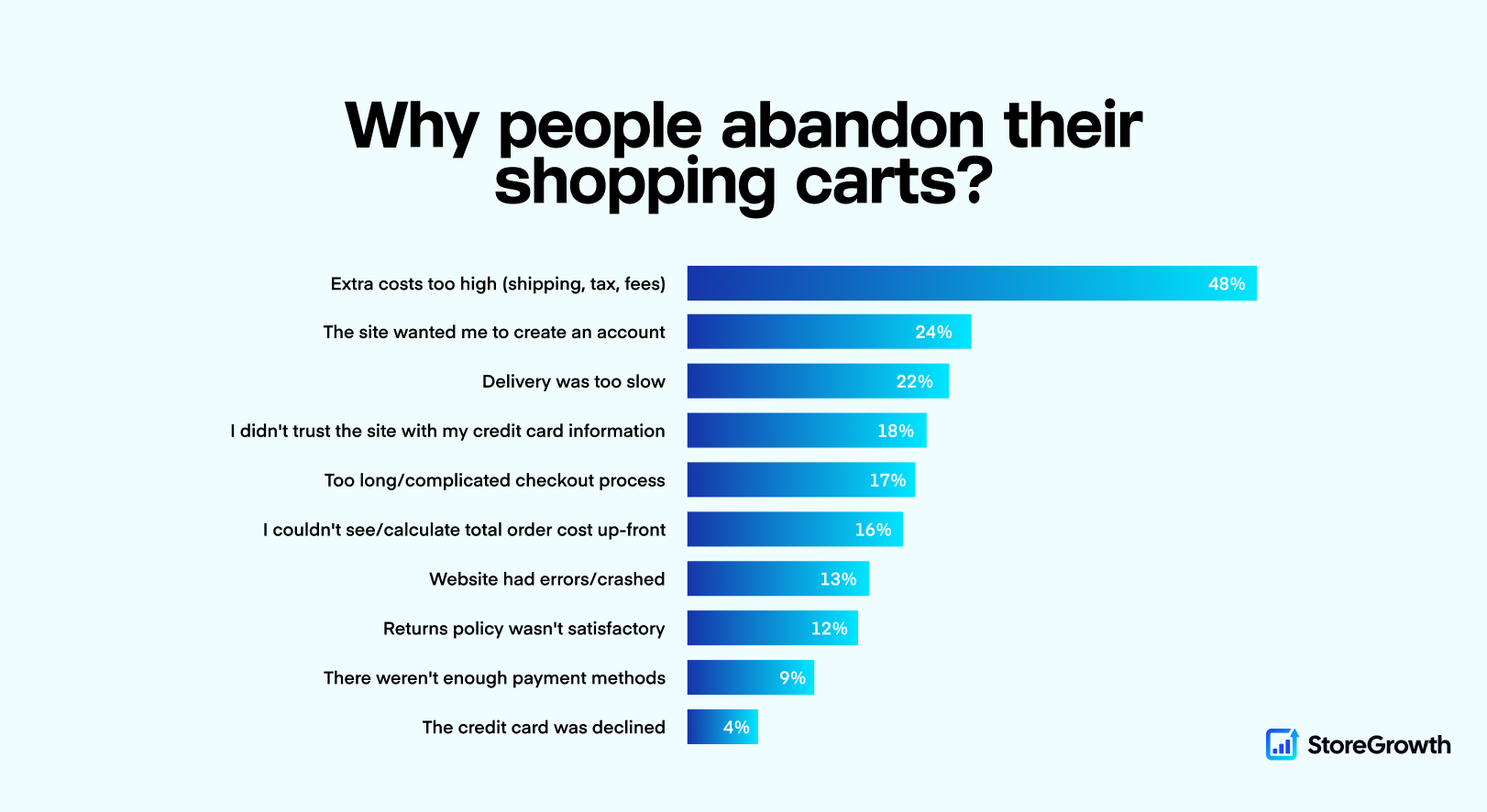
Why Do People Abandon Carts?
Before you can fix the problem, you have to understand why the problem exists in the first place.
Customers don’t abandon carts because they hate your products. They abandon them for predictable, human reasons. These reasons might include the following.
A lot of different things might happen during the buying journey. It’s very important for you to optimize the user journey, reduce distractions, and convince customers to purchase instantly.
5 Proven WooCommerce Abandoned Cart Email Templates
We’ve discussed a lot of reasons why customers abandon carts, and how to optimize the customer journey. Now, let’s explore how you can stop cart abandonment in its tracks.
Ready to build your ultimate email sequence? Here are 5 proven templates for you to try.
Mix and match them to create a 3-email sequence that is polite, persistent, and persuasive.
Template 1: The Gentle Reminder
This is your quickest win because it catches people while the cart is still fresh in their head. Most shoppers are not rejecting you, they are just distracted. So your job here is simple: bring them back without making it weird.
Keep it short, keep it helpful, and make the return path effortless. One clear button. The products they left behind. A calm line that says reply if you need help. You are not negotiating, you are removing friction.
Here’s how your email might look like:
Your cart is saved 🙂
We saved your items so you can finish checkout in seconds.
Quick reminder
Hi [Customer Name],
Looks like you added a few items to your cart and then got pulled away. Happens to the best of us.
Your cart is still saved and ready. Finish checkout now and we will keep everything exactly as you left it.
Return to My CartIf the button does not work, open this link: [Cart Link]
|
Everyday Canvas Backpack |
$59.00 | |
|
Stainless Steel Water Bottle 1L |
$24.00 |
Subtotal$83.00
Shipping and tax are calculated at checkout
Questions about sizing, shipping, or checkout? Reply to this email and we will help you finish your order.
Template 2: Urgency Reminder
This is the decision email. If they ignored the first reminder, they are either procrastinating or comparing options. A generic follow up will not change that. They need a real reason to act now.
The keyword is real. Only use urgency you can defend, like low stock or a timer tied to an actual offer they saw on site. If the deadline is believable, this email feels like a useful heads up. If it is fake, it turns into noise.
Here’s how your email might look like:
Your cart expires soon ⏰
A quick reminder before your cart changes.
The clock is ticking
Hi [Customer Name],
Your items are still in your cart, but inventory updates fast. If you want these, now is the safest time to checkout.
If you unlocked a limited offer, it expires soon. Once it is gone, it is gone.
Complete My Purchase NowIf the button does not work, open this link: [Cart Link]
|
|
Everyday Canvas Backpack |
$59.00 |
|
|
Stainless Steel Water Bottle 1L |
$24.00 |
Subtotal$83.00
Shipping and tax are calculated at checkout
Need help with checkout or shipping options? Reply here and we will sort it out fast.
Template 3: The Discount Offer
This is your last lever, not your first instinct. If the shopper is still sitting on the cart after a reminder and an urgency nudge, the most common blocker left is value versus price.
Offer a small, time-limited incentive that makes the decision easy, then stop. Do not keep chasing them with more discounts. And do not send this too early, unless you want to train your customers to abandon carts on purpose and wait for coupons like it is a hobby.
Here's how your email might look like:
A little treat to finish checkout 🎁
Here is 15 percent off if you want to wrap this up today.
Final offer
Hi [Customer Name],
You picked great items. If price is the only thing holding you back, here is a small discount to make the decision easy.
Use the code below at checkout. It is time limited, so grab it while it is still active.
Apply Discount and Check OutIf the button does not work, open this link: [Cart Link]
|
Everyday Canvas Backpack |
$59.00 | |
|
Stainless Steel Water Bottle 1L |
$24.00 |
Subtotal$83.00
Shipping and tax are calculated at checkout
If you have a question before you buy, reply to this email. A real human will answer.
Template 4: The Social Proof
This is the alternative to urgency for shoppers who need confidence, not pressure. If someone is hesitating, it is usually because they are unsure the product will meet expectations. Social proof closes that gap fast.
Use one strong review, keep it specific, and make it easy to imagine the outcome.
Here's how your email might look like:
People love what you picked ⭐
A quick look at what other shoppers are saying.
Good choice
Hi [Customer Name],
The items in your cart are some of our most loved picks. If you are hesitating, this is the part where we show proof, not opinions.
Take a quick look at a recent review below, then come back and finish in a minute.
Complete My OrderIf the button does not work, open this link: [Cart Link]
|
Everyday Canvas Backpack |
$59.00 | |
|
Stainless Steel Water Bottle 1L |
$24.00 |
Subtotal$83.00
Shipping and tax are calculated at checkout
Want help choosing the right option? Reply to this email and we will recommend the best fit.
Template 5: The Problem-Solver
This email assumes the cart died because something broke, confused, or felt risky. Shipping looked strange. A coupon did not apply. The checkout button lagged. Or they had a simple question and no easy place to ask it.
So you do the most underrated conversion tactic in eCommerce. You invite a reply. Make it clear a real person will respond. You are not just recovering a cart, you are removing a silent blocker that would have killed the purchase anyway.
Here's how your email might look like:
Need help checking out? 🤔
If something felt off, reply here and we will help you finish your order.
Hi [Customer Name],
We noticed you started checkout but did not complete it. If something broke, looked confusing, or felt risky, tell us what happened and we will fix it fast.
Or just try again using the button below. Your cart is still saved.
Return to My CartIf the button does not work, open this link: [Cart Link]
|
Everyday Canvas Backpack |
$59.00 | |
|
Stainless Steel Water Bottle 1L |
$24.00 |
Subtotal$83.00
Shipping and tax are calculated at checkout
Reply to this email with any question and we will respond quickly.
How To Make The Most Out Of These Templates
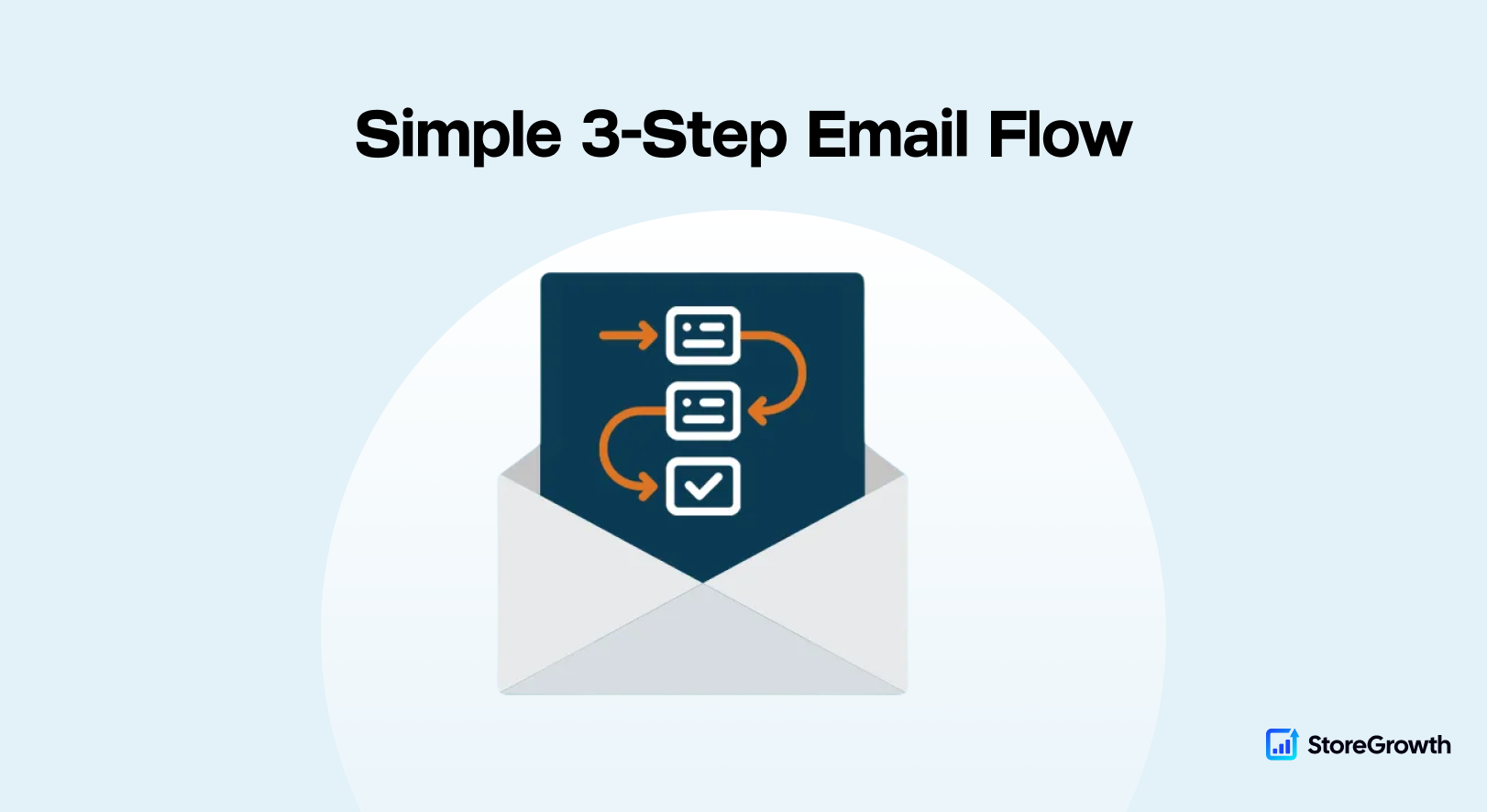
Don't just send one email and give up trying. These templates are designed in such a way, so that you can send them in a 3-step workflow to re-engage potential buyers.
For example, you can either send a gentle reminder or help solve their problems when the cart abandonment happens.
After 24 hours, you can send them an urgency trigger stating that the offer ends soon, or showcase social proof to solidify their purchase decision.
After 48-72 hours of cart abandonment, you can also re-engage with a custom offer or discount so that they can overcome all their objections and grab the incentive.
| When to Send | Template to Use | Goal | |
|---|---|---|---|
|
Email 1
|
1 to 3 hours |
Catch the distracted shopper with a low pressure, helpful nudge.
|
|
|
Email 2
|
24 hours |
Create urgency or confidence so the shopper makes a decision.
|
|
|
Email 3
|
48 to 72 hours |
Overcome the final price objection with a last chance incentive.
|
Think of this as a polite follow up, not a three day interrogation.
Other Strategies You Can Implement
You know what's even better than recovering a lost sale?
Never losing it in the first place.
The #1 reason for abandonment is friction. Your goal should be to make the path from "Add to Cart" to "Thank You" as fast and seamless as possible.
This is where the StoreGrowth Sales Booster truly shines. It’s a complete toolkit designed to plug the leaks in your WooCommerce funnel.
1. Fix Checkout Friction with Direct Checkout
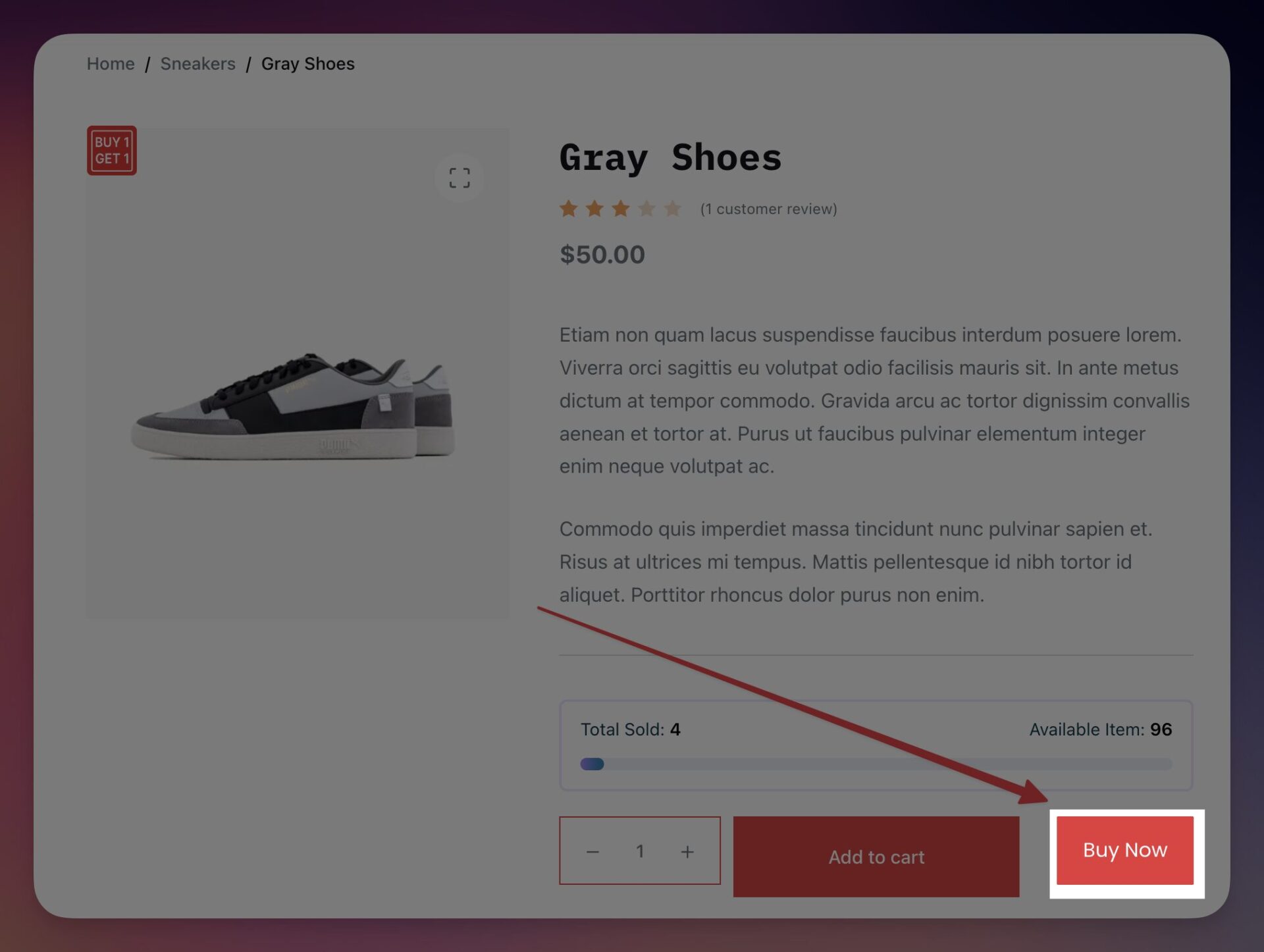
Here's the deal: the cart page is often just an unnecessary extra step. For decisive customers, it's a roadblock.
The Direct Checkout module lets you add a "Buy Now" button to your product pages that skips the cart entirely and sends the customer straight to the checkout page.
This one change can dramatically reduce friction and capture high-intent buyers the moment they decide to purchase.
2. Reduce Sticker Shock with a Free Shipping Bar
Unexpected costs are the number one reason for abandoned carts. Customers hate getting to the checkout page and seeing a high shipping fee they didn't plan for.
The Free Shipping Bar module fixes this. It places a clear, dynamic bar at the top of your site that says, "You're only $12.50 away from free shipping!"
This does two things:
3. Keep Customers Shopping with a Fly Cart
Why force a customer to a new page just to see what's in their cart?
The Fly Cart module replaces this clunky process with a sleek, slide-out side cart.
When a customer adds an item, the cart appears on the side, confirming the addition. They can then keep shopping without ever leaving the page. It's a modern, frictionless experience that keeps the buying momentum high.
People Usually Ask
Thanks for reading all the way through. Let's now go through some of the commonly asked questions by our readers.
Does WooCommerce send abandoned cart emails by default?
Not really. WooCommerce will email order receipts, password resets, and other transactional stuff. But true abandoned cart recovery emails usually need an extension or a tool that can detect abandonment, store the cart, and send follow ups at the right time.
When to send abandoned cart emails for the best recovery rate?
Start fast. The best abandoned cart email best practices usually look like this: Email 1 within 1 to 3 hours, Email 2 at 24 hours, Email 3 at 48 to 72 hours. You are basically catching distracted buyers first, then pushing a decision, then using a final incentive for the price sensitive holdouts.
How many abandoned cart emails should I send?
Three is the sweet spot for most WooCommerce stores. One email is wishful thinking. Five emails is how you get muted. A tight 3 email sequence gives you persistence without turning into a daily newsletter nobody asked for.
Should I include a discount in my abandoned cart email sequence?
Yes, but only as the last step. If you discount too early, you train shoppers to abandon carts on purpose and wait for coupons like it is a sport. Use Template 3 at 48 to 72 hours, keep the offer time limited, and keep the wording simple.
What are the best abandoned cart subject lines to use?
Short, specific, and human works best. Use a gentle reminder first, then urgency or proof, then the final offer. Also, match the subject line to what the email actually does. If it screams urgency but nothing is expiring, shoppers will clock it instantly.
Can I use a countdown timer inside an abandoned cart email?
In real email clients, true live countdown timers are tricky because most clients block scripts. The safe route is a countdown image or an animated timer graphic that updates server side. The goal is the same either way: show a believable deadline, not a fake panic button.
Conclusion
Abandoned carts are not a mystery. Most shoppers are not rejecting your store, they are stalling, getting distracted, or hitting friction at checkout.
A simple 3 step sequence fixes that: a gentle reminder within 1 to 3 hours, a decision email at 24 hours using real urgency or social proof, and a final discount email at 48 to 72 hours for the people who need a nudge on price.
Start with these templates, keep the timing tight, and stay honest with urgency.
Other than just relying on winback techniques, you must also work on improving the store performance and experience. We recommend you also try out StoreGrowth, and see how it can help increase sales and recover lost conversions within your store, without additional hassle!
Leave a Reply
You must be logged in to post a comment.